logo
  • Home
  • Automation
    • Accounts
    • Dashboard
  • Liquid Rewards
  • BuyMyCards
  • Mystery Box
  • Docs
  • •••
    • Upgrade Advisor
    • Discounted Accounts
    • VortexBot
    • 👤Account
    • 🧮Reward Share
    • ⏩Boost Mode
    • 💀Survival Mode
    • 💵Billing Update
    • 💫XCredits
    • 🖇️Discord Role
    • 💰Rental Feature
    • 🌊Liquid Rewards
    • 🃏BuyMyCards
    • 🎁Mystery Box
    • 📊Analysis Board
    • 🏝️Land Auto-Harvest
    • 🏷️Discounted Accounts
  • 🩺Support

Discord Role


How to get the Discord role:

  1. Navigate to XBOT.app/accounts and sign in to your XBOT account
  2. Click on ⚙️ Advanced
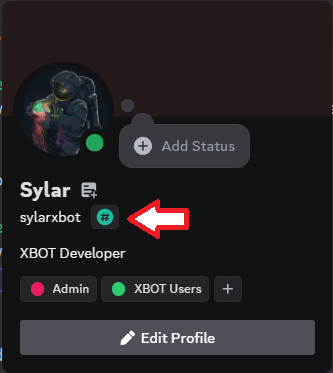
  3. Enter your Discord username. Note that the username is different from the display name. See image below
← Previous💫 XCreditsNext →💰 Rental Feature

XBOT © 2023 | Join our discord:

discord logo
logo