
Rental Feature
✅ | Save time on rentals - XBOT finds the cheapest cards and rents them
✅ | Set & forget - No maintenance needed after setup
✅ | Experiment & improve - Access dozens of public decks for inspiration
✅ | Subsidized gas fees (RC) - Don't worry about gas fees since XBOT covers them
Getting Started with Peakmonsters Decks
Peakmonsters Decks allow users to build, save and share Decks (collections of cards).
You can build your own or use one of the many public decks available.
Each Deck has a unique ID
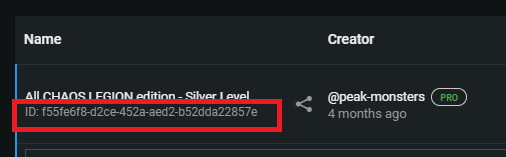
Setting up XBOT to Automate Rentals
Note that we require Rental Authority to rent cards on your behalf. This can be setup in the same place where the Posting key was added.
This authority only permits our system to rent cards, and no other type of transaction.
- Simply copy-paste the Deck ID into XBOT's Rental Config, as shown below:
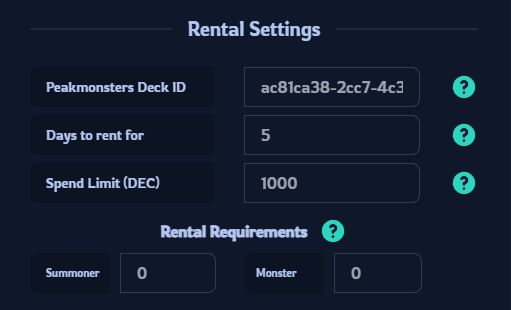
- Set the number of days to rent for - Minimum is 2
- Set the Spend Limit in DEC. This is the daily rent price of all cards multiplied by the number of days. For example, if the daily DEC cost of the Deck is 200 DEC, and you're renting for 5 days, set the Spend Limit to 1000. (An extra 10% buffer is recommended in case of price fluctuations)
- (Optional) Setup Rental Requirements. Set how many cards must be rented for a session to start, as a percentage of the total. For example: If you choose 90%, and the Peakmonsters deck has 30 cards, then 27 cards must be rented for the bot session to start